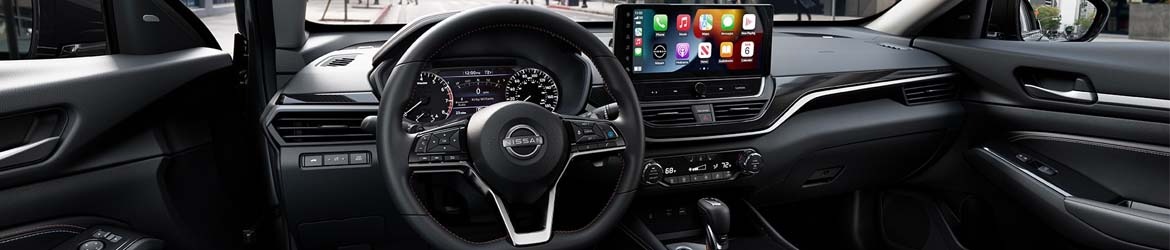
Designed to elevate your driving experience, the Nissan infotainment system provides seamless access to vehicle functions, connectivity, and entertainment. To get the most out of it, check out these tips from your local Nissan dealer.
Getting the Most Out of the Nissan Infotainment System
Connect Your Google Account
Based on the Google interface, the NissanConnect infotainment system brings Google built-in advantages, including access to your favorite Google apps, Google Maps navigation, and real-time traffic information. You can also access the Google Store to download new apps directly to your Nissan’s infotainment system. Connecting your Google account gives you access to all these features for a personalized experience.
Get the MyNISSAN App
Compatible with Android and Apple devices, the MyNISSAN app brings exciting features, such as remote vehicle control, to the palm of your hand. For instance, you can lock and unlock the doors, control the cabin’s climate, or check the fuel or charge level, depending on your vehicle. The app also provides access to important owner information, allows you to access vehicle health reports, and includes maintenance reminders.
Use Voice Commands
The NissanConnect system boasts advanced communication features, including voice recognition that allows you to use voice commands to control vehicle functions, entertainment, or the navigation system in equipped vehicles. These hands-free systems are easy to activate by saying Hello Google or Hello Nissan, and you can then use the virtual assistant to operate the various features.
Most Nissan vehicles also include a hands-free text messaging assistant, so you can have your car read a text out loud or send a text without taking your hands off the steering wheel.
Integrate Your Smartphone
Smartphone integration is one of NissanConnect’s standard features, allowing you to connect your smartphone to your vehicle via Bluetooth, Apple CarPlay, or Android Auto. Bluetooth connectivity enables hands-free phone control, so you can use voice commands to answer or make calls and read or send texts, but you can also stream your playlists, podcasts, or audiobooks directly from your compatible devices.
Apple CarPlay and Android Auto integration enable smartphone mirroring, providing access to your favorite communication and navigation apps, as well as other compatible applications.
Try Nissan’s Infotainment at Your Local Nissan Dealer
No matter what Nissan model you drive or plan to buy, you can discover the various features and learn more about your vehicle’s infotainment system here at our Decatur dealership. Our expert team knows the ins and outs of each model’s technology, so we can provide information and tips specific to your car.
To make the most out of your Nissan’s infotainment, visit or give us a call at Lynn Layton Nissan in Decatur, AL. We will be here to answer any questions you might have or schedule a test drive so you can try the NissanConnect on the road.
Posted in
Decatur Nissan Dealer, Nissan Tips & Tricks |
No Comments »